


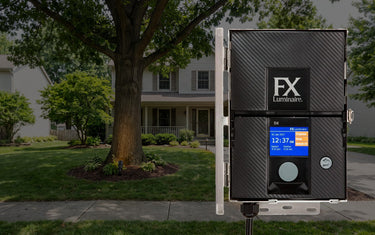
An astronomical timer (often called an astro timer) is supposed to calculate sunset and sunrise from your location and the current date, then switch the landscape lighting on and off automatically. When it works, you forget it exists. When it drifts off schedule, lights either burn through the daylight hours, come on at midnight, or fire and shut off in five-minute cycles. The cause is almost always one of five things, and each has a specific fix.
How an Astro Timer Calculates Schedule
An astro timer needs four inputs to compute correct sunset:
- Latitude
- Longitude
- Current date
- Time zone (and whether daylight saving time is observed)
From those inputs it calculates the time of sunset to within a minute. Most models offer a configurable offset so you can run lights from 30 minutes before sunset, or until sunrise, or for a fixed number of hours after dusk.
If any of the four inputs are wrong, the lights run on the wrong schedule. That is almost always the root cause.
Cause 1: Time Zone or Daylight-Saving Setting Is Wrong
The most common cause. After a power outage or a battery replacement, the timer may default to Eastern Time and DST On regardless of where it is installed. A controller set to Eastern Time when the home is in Pacific Time will fire three hours late.
Fix:
- Confirm the time zone setting matches the install location
- Confirm the DST observance setting matches local rules (most of the US observes DST; Arizona and Hawaii do not)
- Confirm the current time displayed on the controller matches a known-good clock
Cause 2: Latitude and Longitude Are Wrong or Default
Many astro timers ship with a default latitude and longitude. If the installer never updated them, the timer computes sunset for the factory default location. The error grows as you move further from that default.
Fix:
- Look up the install address on any mapping service and find the latitude and longitude
- Enter both values into the timer's setup menu
- Save and confirm the next-scheduled-event time looks correct for your location
Cause 3: Date Is Wrong
Sunset moves throughout the year. In the continental US, sunset times change by more than three hours between June and December. If the timer's internal calendar is wrong, the calculated sunset is wrong by the same gap.
A timer that has lost power for more than a few hours often reverts to a default date.
Fix:
- Set the current date in the timer's menu
- Confirm the next-scheduled-event display now matches expected sunset within a few minutes
Cause 4: Backup Battery Is Dead
Most astro timers have a small internal battery that maintains date, time, and settings during power outages. When the battery dies, every power blip resets the timer to defaults. The lights then run on a wrong default schedule until someone reprograms the unit.
Fix:
- Pull the battery cover and inspect the battery (usually a CR2032 or similar coin cell)
- Replace with a fresh equivalent
- Reprogram the timer with current date, time, location and zone
Replace the battery preventively every 3-5 years on outdoor controllers. They sit in temperature extremes that shorten battery life.
Cause 5: Schedule Programming Error
Less common, but worth checking. The timer may be programmed for a custom schedule that overrides the astronomical calculation. Examples:
- A fixed on time at 6:00 PM that fires the same regardless of season
- An off-time set for a specific clock hour rather than a sunrise offset
- A holiday or vacation override that someone forgot to clear
Fix:
- Walk the full program menu, not just the most recently used screen
- Reset to astronomical mode if it was previously switched to fixed-time mode
- Clear any vacation, holiday or temporary override
When the Timer Is Right and the Lights Still Look Wrong
If the timer says sunset is 6:42 PM and the lights come on at 6:42 PM, the timer is working. If they look too early or too late for your taste, adjust the on and off offsets rather than fighting the timer.
Common useful offsets:
- Lights on 30 minutes before sunset for a softer transition
- Lights off at midnight (a fixed clock time, often preferred over sunrise)
- Lights on at sunset, off at sunrise for security-driven installations
Diagnostic Order That Saves Time
- Check the time displayed against a known clock
- Check time zone and DST settings
- Check current date
- Check latitude and longitude
- Replace backup battery if older than 3 years
- Audit the full schedule for overrides
Five of these six checks take under a minute each.
When to Replace the Timer
Replace the timer if:
- The display is dim or sections are missing pixels
- The unit drifts off correct time even with a fresh battery
- Buttons stick or fail to register
- The case shows water intrusion or corrosion on internal contacts
Astro timers are inexpensive compared to a service call. If the unit is over 10 years old and acting up, replacement is faster and more reliable than repair.
Smart Controller Note
Smart lighting controllers that connect to Wi-Fi or a hub eliminate most astro-timer drift problems. They pull current date, time zone, and DST from the network, and they let you adjust the schedule from a phone. They cost more, but they remove the four-input setup step that causes most astro-timer complaints.
Next Step
Start with the time zone and date. If those are right, latitude and longitude come next. If all four inputs check out and the lights still fire wrong, the schedule has an override hiding in a sub-menu. Walk every screen.


